Public Member Functions | |
| __init__ (self, **kwargs) | |
| varList (self) | |
| attachArraySpecToEntity (self) | |
| checkImplicitNone (self, mustRaise=False) | |
| checkIntent (self, mustRaise=False) | |
| checkONLY (self, mustRaise=False) | |
| checkTopLevelUSE (self, mustRaise=False) | |
| checkKeyDimConsistency (self, mustRaise=False, stopScopes=None) | |
| removeVar (self, varList, simplify=False) | |
| addVar (self, varList) | |
| addModuleVar (self, moduleVarList) | |
| showUnusedVar (self) | |
| checkUnusedLocalVar (self, mustRaise=False, excludeList=None) | |
| removeUnusedLocalVar (self, excludeList=None, simplify=False) | |
| addExplicitArrayBounds (self, node=None) | |
| addArrayParentheses (self) | |
| addArrayParenthesesInNode (self, node) | |
| removeArrayParenthesesInNode (self, node) | |
| modifyAutomaticArrays (self, declTemplate=None, startTemplate=None, endTemplate=None) | |
| findIndexArrayBounds (self, arr, index, loopVar) | |
| arrayR2parensR (self, namedE, table) | |
| findArrayBounds (self, arr, loopVar, extraVarList=None) | |
| renameVar (self, oldName, newName) | |
| removeVarIfUnused (self, varList, excludeDummy=False, excludeModule=False, simplify=False) | |
| isVarUsed (self, varList, exactScope=False, dummyAreAlwaysUsed=False) | |
| addONLY (self, parserOptions=None, wrapH=False) | |
| addArgInTree (self, varName, declStmt, pos, stopScopes, moduleVarList=None, otherNames=None, parserOptions=None, wrapH=False) | |
Static Public Member Functions | |
| varSpec2stmt (varSpec, implicitDeclaration=False) | |
Public Attributes | |
| path | |
Protected Member Functions | |
| _normalizeScopeVar (self, scopeVarList) | |
| _normalizeUniqVar (self, scopeVarList) | |
Protected Attributes | |
| _varList | |
| _excludeContains | |
Detailed Description
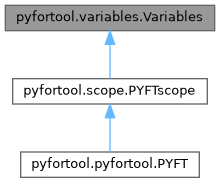
Methods to manage and manipulate FORTRAN variables.

Provides functionality for declaring, removing, and checking variables
in FORTRAN source code.
Definition at line 390 of file variables.py.
Constructor & Destructor Documentation
◆ __init__()
| pyfortool.variables.Variables.__init__ | ( | self, | |
| ** | kwargs | ||
| ) |
Initialize the Variables handler.

Parameters
----------
**kwargs
    Keyword arguments for compatibility with parent class initialization.
Reimplemented in pyfortool.pyfortool.PYFT, and pyfortool.scope.PYFTscope.
Definition at line 398 of file variables.py.
Member Function Documentation
◆ _normalizeScopeVar()
|
protected |
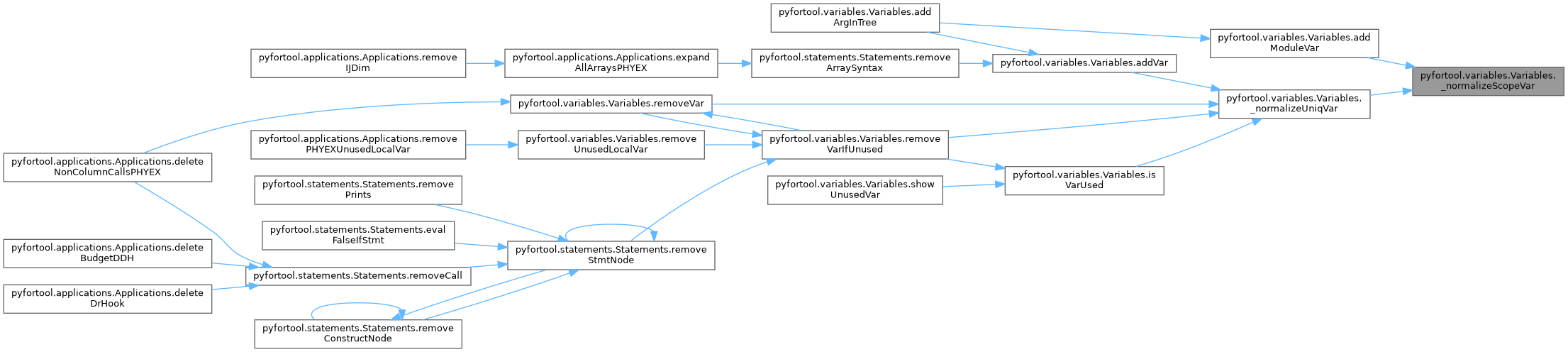
Internal method to normalize scopeVarList
(list of tuples made of scope path, variable name, and optional other values)
Definition at line 436 of file variables.py.

◆ _normalizeUniqVar()
|
protected |
Internal method to suppress duplicates in scopeVarList
(list of tuples made of scope path, variable name, and optional other values)
Definition at line 445 of file variables.py.


◆ addArgInTree()
| pyfortool.variables.Variables.addArgInTree | ( | self, | |
| varName, | |||
| declStmt, | |||
| pos, | |||
| stopScopes, | |||
moduleVarList = None, |
|||
otherNames = None, |
|||
parserOptions = None, |
|||
wrapH = False |
|||
| ) |
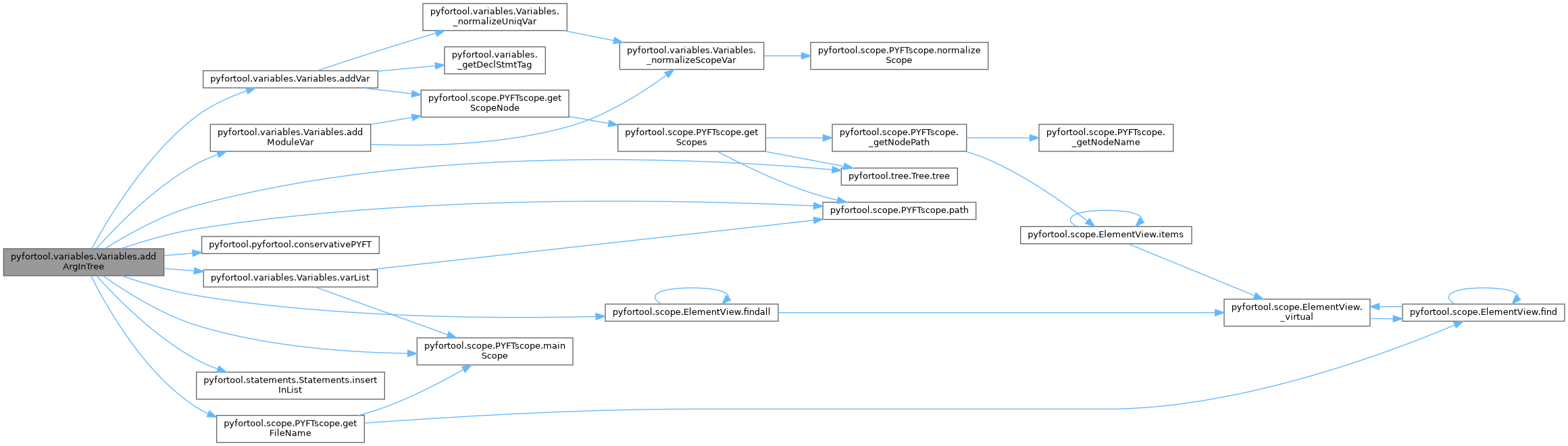
Adds an argument to the routine and propagates it upward until we encounter a scope
where the variable exists or a scope in stopScopes
:param varName: variable name
:param declStmt: declarative statment (will be used by addVar)
:param pos: position of the variable in the list of dummy argument
:param stopScopes: list of scopes to reach
:param moduleVarList: list of module variable specification to insert in the xml code
                      a module variable specification is a list of two elements:
                      - module name
                      - variable name or or list of variable names
                        or None to add a USE statement without the ONLY attribute
                      use moduleVarList to not add module variables
:param otherNames: None or list of other variable names that can be used
                   These variables are used first
:param parserOptions, wrapH: see the PYFT class

Argument is inserted only on paths leading to one of scopes listed in stopScopes
Definition at line 2109 of file variables.py.
◆ addArrayParentheses()
| pyfortool.variables.Variables.addArrayParentheses | ( | self | ) |
Add explicit array parentheses to array variables.

Transforms array variable references to include explicit slice notation.
For example, A becomes A(:) when A is declared as an array.

Examples
--------
Given declaration: REAL, DIMENSION(10) :: A, B, C
And usage: A = B + C

After transformation:
A(:) = B(:) + C(:)

Notes
-----
- Only modifies known arrays (declared with dimensions).
- Excludes arrays in ALLOCATED, ASSOCIATED, and PRESENT intrinsic calls.
- Does not modify pointer/allocatable arrays in call statements
  (to maintain interface compatibility).
Definition at line 1288 of file variables.py.

◆ addArrayParenthesesInNode()
| pyfortool.variables.Variables.addArrayParenthesesInNode | ( | self, | |
| node | |||
| ) |
Add explicit array parentheses to arrays within a specific XML node.

Parameters
----------
node : xml element
    XML node in which to add array parentheses.
    Only processes named-E elements within this node.

See Also
--------
addArrayParentheses : Add parentheses in all scopes.

Examples
--------
>>> pft = PYFT('input.F90')
>>> node = pft.find('.//{*}a-stmt')
>>> pft.addArrayParenthesesInNode(node)
Definition at line 1350 of file variables.py.

◆ addExplicitArrayBounds()
| pyfortool.variables.Variables.addExplicitArrayBounds | ( | self, | |
node = None |
|||
| ) |
Replace implicit array bounds with explicit bounds from declarations.

Transforms array slice notation (e.g., A(:)) into explicit bounds
based on the array's declaration.

Parameters
----------
node : xml element, optional
    Specific XML node to transform. If None (default), transforms
    all implicit bounds in all scopes.

Examples
--------
Given declaration: REAL, DIMENSION(1:10) :: A, B
And usage: A(:) = B(:)

After transformation:
A(1:10) = B(1:10)

Notes
-----
- Only handles 1D array slices (A(:) notation).
- Does not modify allocatable arrays (where ':' is part of declaration).
- Does not modify character type arrays.
Definition at line 1210 of file variables.py.

◆ addModuleVar()
| pyfortool.variables.Variables.addModuleVar | ( | self, | |
| moduleVarList | |||
| ) |
Add USE statements for module variables.

Parameters
----------
moduleVarList : list of list/tuple
    List of module variable specifications. Each specification is a list
    of three elements:
    - Scope path (str): path to the location where USE should be added
      (e.g., 'module:MOD/sub:SUB').
    - Module name (str): name of the module to USE.
    - Variable name(s) (str, list, or None):
      - str: single variable name to import.
      - list: list of variable names to import.
      - None: add USE without ONLY clause (import all).

Examples
--------
Import single variable Y from MODD_XX into subroutine FOO:
>>> pft = PYFT('input.F90')
>>> pft.addModuleVar([('sub:FOO', 'MODD_XX', 'Y')])
! Adds: USE MODD_XX, ONLY: Y

Import multiple variables:
>>> pft.addModuleVar([('sub:FOO', 'MODD_XX', ['X', 'Y', 'Z'])])
! Adds: USE MODD_XX, ONLY: X, Y, Z

Add USE without ONLY (import all):
>>> pft.addModuleVar([('sub:FOO', 'MODD_XX', None)])
! Adds: USE MODD_XX

Import into a module:
>>> pft.addModuleVar([('module:MOD', 'OTHER_MOD', 'VAR')])

Notes
-----
- Existing USE statements for the same module are updated to include new variables.
- Duplicate imports are avoided (variables already imported are not re-added).
Definition at line 996 of file variables.py.


◆ addONLY()
| pyfortool.variables.Variables.addONLY | ( | self, | |
parserOptions = None, |
|||
wrapH = False |
|||
| ) |
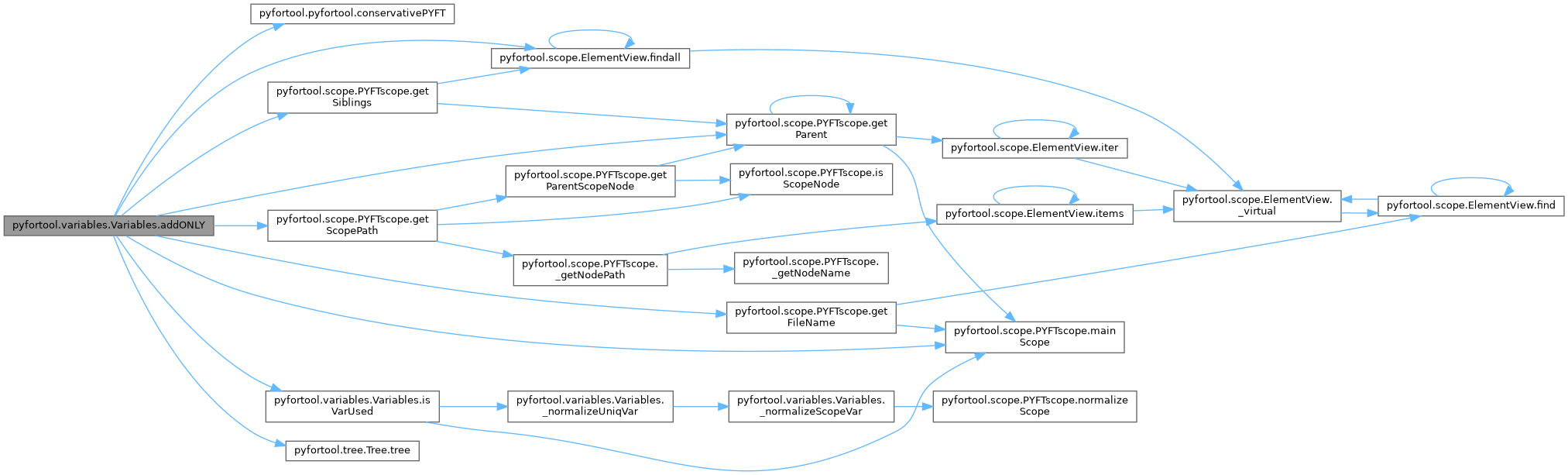
Adds missing ONLY clause to USE statements
:param parserOptions, wrapH: see the PYFT class
Definition at line 2026 of file variables.py.
◆ addVar()
| pyfortool.variables.Variables.addVar | ( | self, | |
| varList | |||
| ) |
Add variables to declarations and argument lists.

Parameters
----------
varList : list of list/tuple
    List of variable specifications to insert. Each specification is a list
    of four elements:
    - Scope path (str): path to the module, subroutine, function, or type
      where the variable should be declared (e.g., 'module:MOD/sub:SUB').
    - Variable name (str): name of the variable to add.
    - Declaration statement (str): FORTRAN declaration (e.g., 'REAL, INTENT(IN) :: X').
    - Position (int or None): position in dummy argument list for arguments,
      None for local variables.

Examples
--------
Add a local variable:
>>> pft = PYFT('input.F90')
>>> pft.addVar([('module:MOD/sub:SUB', 'LOCAL_VAR', 'INTEGER :: LOCAL_VAR', None)])

Add a dummy argument at position 0:
>>> pft.addVar([('module:MOD/sub:SUB', 'ARG', 'REAL, INTENT(IN) :: ARG', 0)])

Add multiple variables:
>>> pft.addVar([
...     ('module:MOD/sub:SUB', 'X', 'REAL :: X', None),
...     ('module:MOD/sub:SUB', 'Y', 'INTEGER :: Y', None)
... ])

Notes
-----
- If adding to an argument list, the declaration is automatically updated
  with the INTENT attribute if specified.
- Declaration statements are inserted before the first executable statement.
Definition at line 880 of file variables.py.


◆ arrayR2parensR()
| pyfortool.variables.Variables.arrayR2parensR | ( | self, | |
| namedE, | |||
| table | |||
| ) |
Transform a array-R into a parens-R node by replacing slices by variables
In 'A(:)', the ':' is in a array-R node whereas in 'A(JL)', 'JL' is in a parens-R node.
Both the array-R and the parens-R nodes are inside a R-LT node
:param namedE: a named-E node
:param table: dictionnary returned by the decode function
:param varList: None or a VarList object in which varaibles are searched for
Definition at line 1710 of file variables.py.

◆ attachArraySpecToEntity()
| pyfortool.variables.Variables.attachArraySpecToEntity | ( | self | ) |
Move DIMENSION attribute from declaration statement to individual entities.

Finds all type declaration statements (T-decl-stmt) that have a DIMENSION
attribute and moves the array specification to each declared variable.

Transformation
-------------
Before:
    REAL, DIMENSION(D%NIJT,D%NKT) :: ZTLK, ZRT
    INTEGER, PARAMETER, DIMENSION(2) :: IBUEXTRAIND=(/18, 30/)

After:
    REAL :: ZTLK(D%NIJT,D%NKT), ZRT(D%NIJT,D%NKT)
    INTEGER, PARAMETER  :: IBUEXTRAIND(2)=(/18, 30/)

Limitations
-----------
- DIMENSION attribute must be in uppercase in the source code.
- Allocatable arrays (with ':') are not modified.
- Variables with existing array specifications are not modified.

Examples
--------
>>> pft = PYFT('input.F90')
>>> pft.attachArraySpecToEntity()
>>> pft.write()  # Writes transformed code
Definition at line 459 of file variables.py.


◆ checkImplicitNone()
| pyfortool.variables.Variables.checkImplicitNone | ( | self, | |
mustRaise = False |
|||
| ) |
Check for missing IMPLICIT NONE statements in scopes.

Issues a logging warning if IMPLICIT NONE is not declared in a scope.
When mustRaise is True, logs an error and raises PYFTError instead.

Parameters
----------
mustRaise : bool, optional
    If False (default), issue a warning and continue.
    If True, issue an error and raise PYFTError.

Examples
--------
>>> pft = PYFT('input.F90')
>>> pft.checkImplicitNone()  # Issues warning if missing
>>> pft.checkImplicitNone(mustRaise=True)  # Raises error if missing
Definition at line 506 of file variables.py.

◆ checkIntent()
| pyfortool.variables.Variables.checkIntent | ( | self, | |
mustRaise = False |
|||
| ) |
Check for missing INTENT attributes on dummy arguments.

Issues a logging warning for each dummy argument without an INTENT attribute.
When mustRaise is True, logs an error and raises PYFTError.

Parameters
----------
mustRaise : bool, optional
    If False (default), issue warnings and continue.
    If True, issue errors and raise PYFTError.

Examples
--------
>>> pft = PYFT('input.F90')
>>> pft.checkIntent()  # Issues warning for missing INTENT
>>> pft.checkIntent(mustRaise=True)  # Raises error
Definition at line 544 of file variables.py.

◆ checkKeyDimConsistency()
| pyfortool.variables.Variables.checkKeyDimConsistency | ( | self, | |
mustRaise = False, |
|||
stopScopes = None |
|||
| ) |
Check consistency of MERGE-based array dimensions across scopes.

For each variable name that has a MERGE-based dimension in any scope,
verify that all occurrences of the same variable name use the same
MERGE expression (full content inside MERGE()).

Parameters
----------
mustRaise : bool, optional
    If False (default), issue warnings and continue.
    If True, issue errors and raise PYFTError.
stopScopes : list of str, optional
    Scope paths to use as roots for call tree filtering.
    When provided (and the tree is available), only scopes
    called by these roots are checked.

Examples
--------
>>> pft = PYFT('input.F90')
>>> pft.checkKeyDimConsistency()
>>> pft.checkKeyDimConsistency(mustRaise=True)
Definition at line 657 of file variables.py.

◆ checkONLY()
| pyfortool.variables.Variables.checkONLY | ( | self, | |
mustRaise = False |
|||
| ) |
Check for missing ONLY clauses in USE statements.

Issues a logging warning for each USE statement not followed by an ONLY clause.
When mustRaise is True, logs an error and raises PYFTError.

Parameters
----------
mustRaise : bool, optional
    If False (default), issue warnings and continue.
    If True, issue errors and raise PYFTError.

Examples
--------
>>> pft = PYFT('input.F90')
>>> pft.checkONLY()  # Issues warning for missing ONLY
WARNING: USE MODULE is not followed by an ONLY clause...
>>> pft.checkONLY(mustRaise=True)  # Raises error
Definition at line 576 of file variables.py.

◆ checkTopLevelUSE()
| pyfortool.variables.Variables.checkTopLevelUSE | ( | self, | |
mustRaise = False |
|||
| ) |
Detect USE statements in top‑level modules.
Checks each module found at the root of the file.  For every
module, all ``<use‑stmt>`` elements are reported.  When
``mustRaise`` is ``True`` an error is logged and a
:class:`PYFTError` is raised; otherwise a warning is produced.

Parameters
----------
mustRaise : bool, optional
    If ``False`` (default), issue warnings and continue.
    If ``True``, issue errors and raise :class:`PYFTError`.
Definition at line 610 of file variables.py.

◆ checkUnusedLocalVar()
| pyfortool.variables.Variables.checkUnusedLocalVar | ( | self, | |
mustRaise = False, |
|||
excludeList = None |
|||
| ) |
Check for unused local variables in scopes.

Issues a logging warning for each local variable that is declared but never used.
When mustRaise is True, logs an error and raises PYFTError.

Parameters
----------
mustRaise : bool, optional
    If False (default), issue warnings and continue.
    If True, issue errors and raise PYFTError.
excludeList : list of str, optional
    List of variable names to exclude from the check.
    These variables will not trigger warnings even if unused.

Examples
--------
>>> pft = PYFT('input.F90')
>>> pft.checkUnusedLocalVar()  # Issues warnings
WARNING: The LOCAL_VAR variable is not used...
>>> pft.checkUnusedLocalVar(excludeList=['TEMP'])  # Exclude TEMP
>>> pft.checkUnusedLocalVar(mustRaise=True)  # Raises error
Definition at line 1113 of file variables.py.


◆ findArrayBounds()
| pyfortool.variables.Variables.findArrayBounds | ( | self, | |
| arr, | |||
| loopVar, | |||
extraVarList = None |
|||
| ) |
Find bounds and loop variable given an array
:param arr: array node (named-E node with a array-R child)
:param loopVar: None to create new variable for each added DO loop
                or a function that return the name of the variable to use for the loop
                    control.
                This function returns a string (name of the variable), or True to create
                a new variable, or False to not transform this statement
                The functions takes as arguments:
                  - lower and upper bounds as defined in the declaration statement
                  - lower and upper bounds as given in the statement
                  - name of the array
                  - index of the rank
:param extraVarList: None or list of variables (such as those contained in a VarList object)
                     defined but not yet available in the self.varList object.
:return: the tuple (table, newVar) where:
            table is a dictionnary: keys are loop variable names
                                    values are tuples with lower and upper bounds
            newVar is a list of loop variables not found in varList. This list has the same
                   format as the varList list.

In case the loop variable cannot be defined, the function returns (None, [])
Definition at line 1804 of file variables.py.

◆ findIndexArrayBounds()
| pyfortool.variables.Variables.findIndexArrayBounds | ( | self, | |
| arr, | |||
| index, | |||
| loopVar | |||
| ) |
Find bounds and loop variable for a given array index
:param arr: array node (named-E node with a array-R child)
:param index: index of the rank of the array
:param loopVar: None to create new variable for each added DO loop
                or a function that return the name of the variable to use for the
                    loop control.
                This function returns a string (name of the variable), or True to create
                a new variable, or False to not transform this statement
                The functions takes as arguments:
                  - lower and upper bounds as defined in the declaration statement
                  - lower and upper bounds as given in the statement
                  - name of the array
                  - index of the rank
:return: the tuple (loopName, lowerBound, upperBound) where:
            loopName is the name of the variable to use for the loop
            lower and upper bounds are the bounds to use for the DO loop
loopName can be:
    - a string
    - False to discard this index
    - True to create a new variable to loop with
Definition at line 1656 of file variables.py.


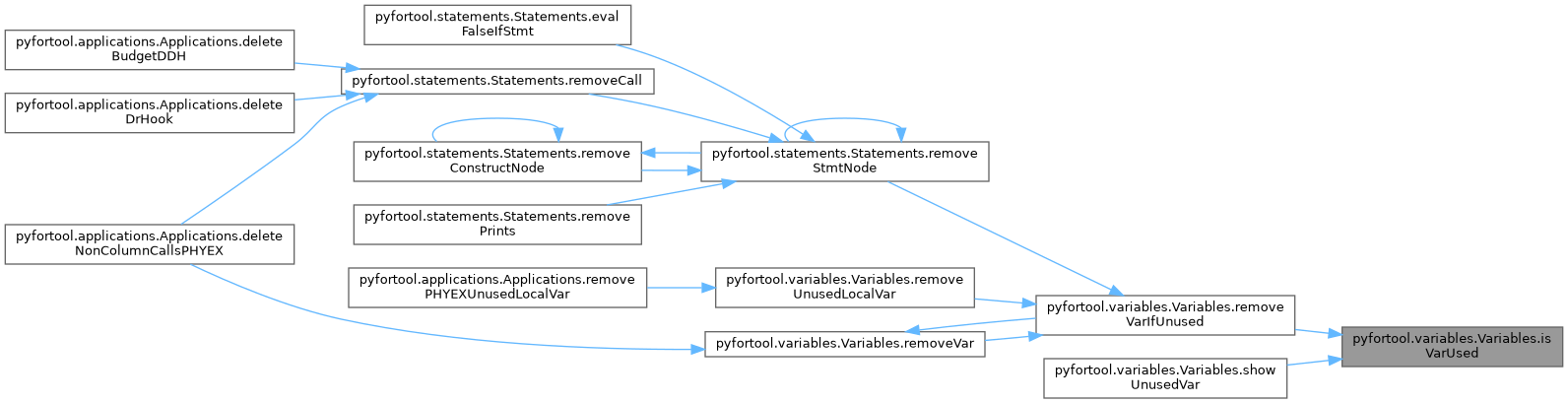
◆ isVarUsed()
| pyfortool.variables.Variables.isVarUsed | ( | self, | |
| varList, | |||
exactScope = False, |
|||
dummyAreAlwaysUsed = False |
|||
| ) |
:param varList: list of variables to test. Each item is a list or tuple of two elements.
                The first one describes where the variable is declared, the second one is
                the name of the variable. The first element is a '/'-separated path with
                each element having the form 'module:<name of the module>',
                'sub:<name of the subroutine>' or 'func:<name of the function>'
:param exactScope: True to search strictly in scope
:param dummyAreAlwaysUsed: Returns True if variable is a dummy argument
:return: a dict whose keys are the elements of varList, and values are True when the
         variable is used, False otherwise

If exactScope is True, the function will search for variable usage
only in this scope. But this feature has a limited interest.

If exactScope is False:
  - if scopePath is a subroutine/function in a contains section,
    and if the variable is not declared in this scope, usages are
    searched in the module/subroutine/function upper that declared
    the variable and in all subroutines/functions in the contains section
  - if scopePath is a module/subroutine/function that has a
    contains sections, usages are searched in all subroutines/functions
    in the contains section

To know if a variable can be removed, you must use exactScope=False
Definition at line 1928 of file variables.py.

◆ modifyAutomaticArrays()
| pyfortool.variables.Variables.modifyAutomaticArrays | ( | self, | |
declTemplate = None, |
|||
startTemplate = None, |
|||
endTemplate = None |
|||
| ) |
Transform automatic arrays using customizable templates.

Modifies automatic array declarations in subroutines and functions by
applying templates for declaration, initialization, and cleanup.

Parameters
----------
declTemplate : str, optional
    Template for the array declaration. If None, declaration is unchanged.
startTemplate : str, optional
    Template for code to insert as the first executable statement
    (e.g., allocation).
endTemplate : str, optional
    Template for code to insert as the last executable statement
    (e.g., deallocation).

Returns
-------
int
    Number of arrays modified.

Placeholders
------------
Each template can use the following placeholders (case-sensitive):

============  ==================================================
Placeholder   Description (for declaration "A(I, I:J, 0:I)")
============  ==================================================
{name}        Variable name (e.g., "A")
{type}        Type specification (e.g., "REAL")
{doubledotshape} Colon-separated dimensions (e.g., ":, :, :")
{shape}       Bounds with indices (e.g., "I, I:J, 0:I")
{lowUpList}   Flattened bounds (e.g., "1, I, I, J, 0, I")
============  ==================================================

Examples
--------
Transform automatic arrays to allocatables:

>>> pft = PYFT('input.F90')
>>> pft.modifyAutomaticArrays(
...     declTemplate="{type}, DIMENSION({doubledotshape}), ALLOCATABLE :: {name}",
...     startTemplate="ALLOCATE({name}({shape}))",
...     endTemplate="DEALLOCATE({name})"
... )

Given input:
    REAL, DIMENSION(I, I:J, 0:I) :: A
    A = 1.0

Produces:
    REAL, DIMENSION(:,:,:), ALLOCATABLE :: A
    ALLOCATE(A(I, I:J, 0:I))
    A = 1.0
    DEALLOCATE(A)

Notes
-----
- Only processes automatic arrays (stack-allocated based on parameters).
- Excludes dummy arguments, allocatable, pointer, and function result arrays.
- Arrays with initial values are not processed.
- Variables are processed in dependency order to handle interdependencies.
Definition at line 1443 of file variables.py.

◆ removeArrayParenthesesInNode()
| pyfortool.variables.Variables.removeArrayParenthesesInNode | ( | self, | |
| node | |||
| ) |
Remove array parentheses if no index selection is needed.

When an array has full slice notation (e.g., A(:,:)) that matches
the entire array, removes the parentheses.

Parameters
----------
node : xml element
    XML node in which to remove unnecessary parentheses.

Transformation
-------------
Before: A(:,:)  (when A is declared as 2D with full bounds)
After:  A

Notes
-----
- Only removes parentheses when all dimensions use full slice (:) notation.
- Preserves parentheses if any dimension has explicit index selection.
- Excludes arrays in ALLOCATED, ASSOCIATED, and PRESENT intrinsic calls.
Definition at line 1397 of file variables.py.

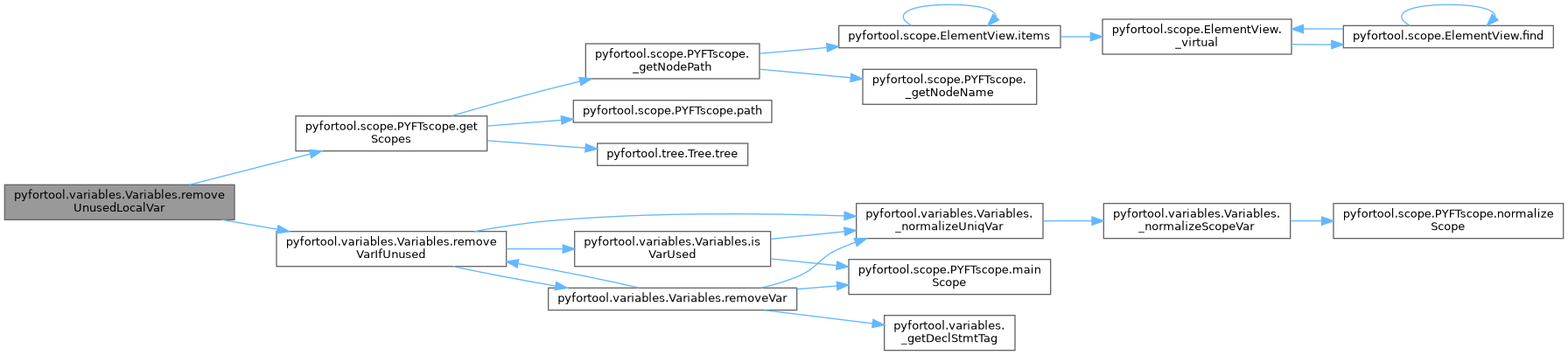
◆ removeUnusedLocalVar()
| pyfortool.variables.Variables.removeUnusedLocalVar | ( | self, | |
excludeList = None, |
|||
simplify = False |
|||
| ) |
Remove unused local variables from declarations.

Removes variables that are declared but never used in the code.
Dummy arguments and module variables are not removed.

Parameters
----------
excludeList : list of str, optional
    List of variable names to exclude from removal.
    These variables will be kept even if unused.
simplify : bool, optional
    If True, also remove variables that become unused after removal
    (e.g., kind selectors).

Examples
--------
>>> pft = PYFT('input.F90')
>>> pft.removeUnusedLocalVar()  # Remove all unused locals

Remove unused locals except TEMP and COUNTER:
>>> pft.removeUnusedLocalVar(excludeList=['TEMP', 'COUNTER'])

With simplification (remove cascading unused vars):
>>> pft.removeUnusedLocalVar(simplify=True)

Notes
-----
- Only local variables (declared in SUBROUTINE/FUNCTION scope) are removed.
- Dummy arguments (subroutine parameters) are preserved.
- Variables imported via USE statements are preserved.
Definition at line 1165 of file variables.py.

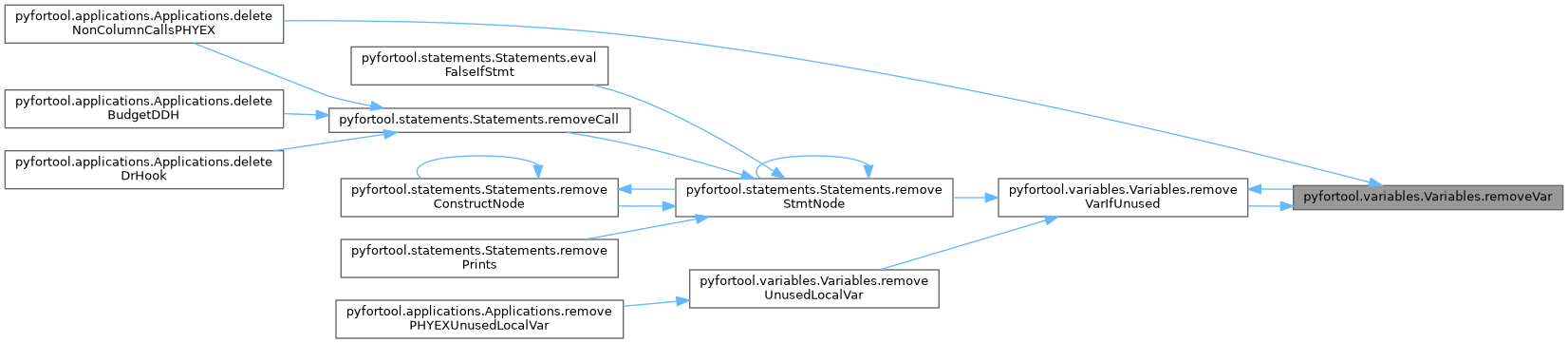
◆ removeVar()
| pyfortool.variables.Variables.removeVar | ( | self, | |
| varList, | |||
simplify = False |
|||
| ) |
Remove variables from declarations and argument lists.

Parameters
----------
varList : list of tuple
    List of variables to remove. Each item is a list or tuple of two elements:
    - First element: scope path where the variable is used (or declared).
      This is a '/' separated path where each element has the form:
      'module:<name>', 'sub:<name>', 'func:<name>', or 'type:<name>'.
    - Second element: variable name (string).

    Example: [('module:MOD/sub:SUB', 'X'), ('module:MOD/sub:SUB', 'Y')]
simplify : bool, optional
    If True, also remove variables that become unused after the deletion
    (e.g., kind selectors used only by the removed variable).

Examples
--------
Remove variable X from subroutine SUB in module MOD:
>>> pft = PYFT('input.F90')
>>> pft.removeVar([('module:MOD/sub:SUB', 'X')])

Remove multiple variables with simplification:
>>> pft.removeVar([('module:MOD/sub:SUB', 'KIND_VAR')], simplify=True)

Notes
-----
- Dummy arguments are removed from both declarations and argument lists.
- USE statement variables are removed from ONLY clauses.
- If all variables in a declaration statement are removed, the statement
  itself is deleted (unless simplify=True, which may delete additional unused variables).
Definition at line 725 of file variables.py.

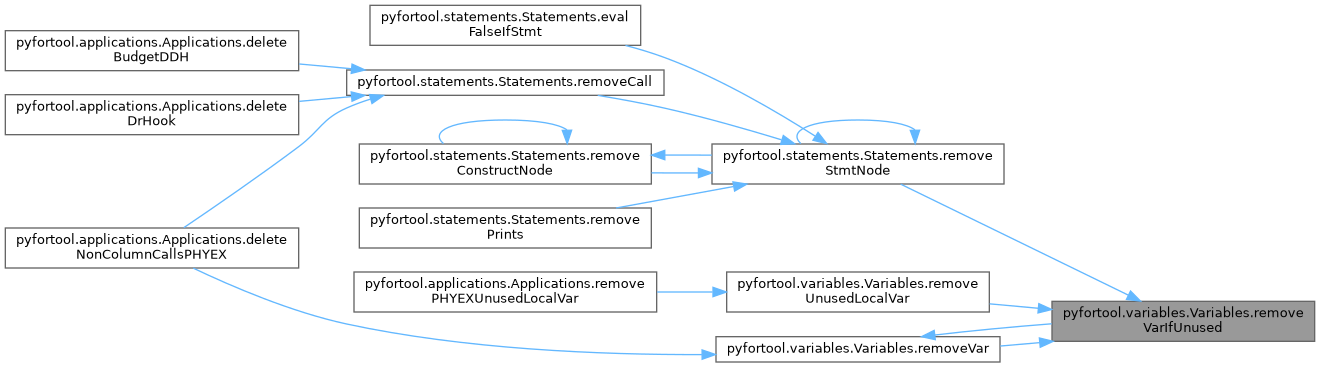
◆ removeVarIfUnused()
| pyfortool.variables.Variables.removeVarIfUnused | ( | self, | |
| varList, | |||
excludeDummy = False, |
|||
excludeModule = False, |
|||
simplify = False |
|||
| ) |
:param varList: list of variables to remove if unused. Each item is a list or tuple of two
                elements.
                The first one describes where the variable is used, the second one is
                the name of the variable. The first element is a '/'-separated path with
                each element having the form 'module:<name of the module>',
                'sub:<name of the subroutine>' or 'func:<name of the function>'
:param excludeDummy: if True, dummy arguments are always kept untouched
:param excludeModule: if True, module variables are always kept untouched
:param simplify: try to simplify code (if we delete a declaration statement that used a
                 variable as kind selector, and if this variable is not used else where,
                 we also delete it)
:return: the varList without the unremovable variables
If possible, remove the variable from declaration, and from the argument list if needed
Definition at line 1897 of file variables.py.

◆ renameVar()
| pyfortool.variables.Variables.renameVar | ( | self, | |
| oldName, | |||
| newName | |||
| ) |
:param oldName: old name of the variable
:param newName: new name of the variable
Definition at line 1883 of file variables.py.

◆ showUnusedVar()
| pyfortool.variables.Variables.showUnusedVar | ( | self | ) |
Display unused variables on stdout.

Searches through all scopes and displays variables that are declared
but never used in the code.

Examples
--------
>>> pft = PYFT('input.F90')
>>> pft.showUnusedVar()
Some variables declared in /module:MOD/sub:SUB are unused:
  - LOCAL_VAR
  - UNUSED_ARRAY
Definition at line 1086 of file variables.py.

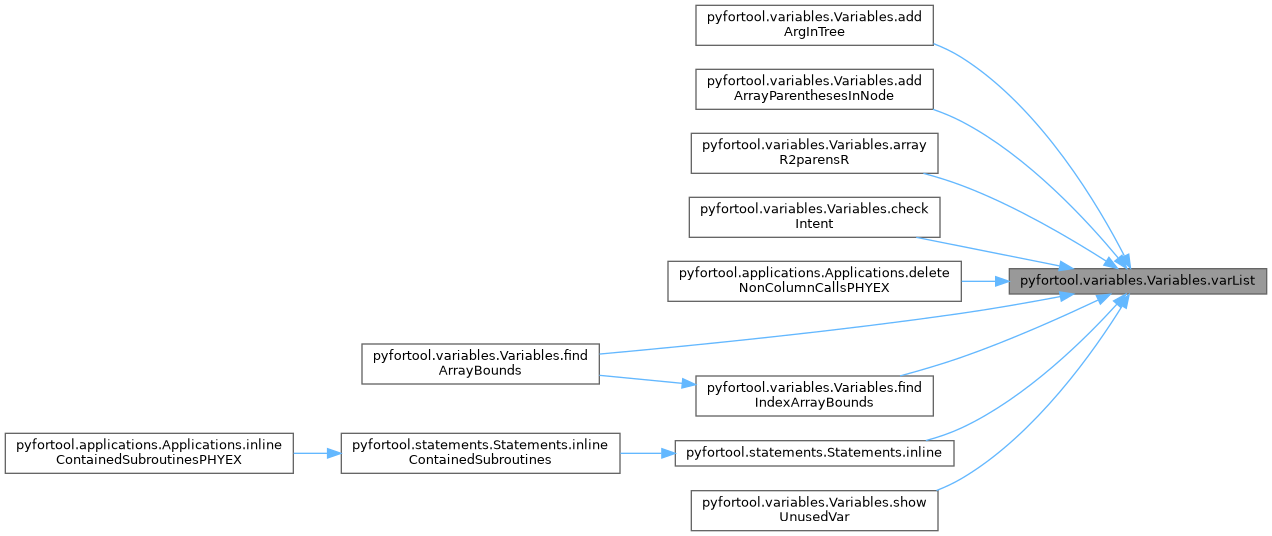
◆ varList()
| pyfortool.variables.Variables.varList | ( | self | ) |
Get the VarList for this scope.

Returns
-------
VarList
    VarList instance containing all variables in the current scope.
    The list is lazily computed on first access.

Examples
--------
>>> pft = PYFT('input.F90')
>>> vl = pft.varList
>>> vl.findVar('X')
{'n': 'X', 't': 'REAL', ...}
Definition at line 410 of file variables.py.

◆ varSpec2stmt()
|
static |
:param varSpec: a variable description, same form as the items return by self.varList
:param implicitDeclaration: True if the variable may contain implicit declaration
(e.g. outside of PHYEX)
:return: the associated declarative statement
Definition at line 1615 of file variables.py.

Member Data Documentation
◆ _excludeContains
|
protected |
Definition at line 433 of file variables.py.
◆ _varList
|
protected |
Definition at line 407 of file variables.py.
◆ path
| pyfortool.variables.Variables.path |
Reimplemented in pyfortool.scope.PYFTscope.
Definition at line 433 of file variables.py.
The documentation for this class was generated from the following file:
- /home/runner/work/pyfortool/pyfortool/src/pyfortool/variables.py